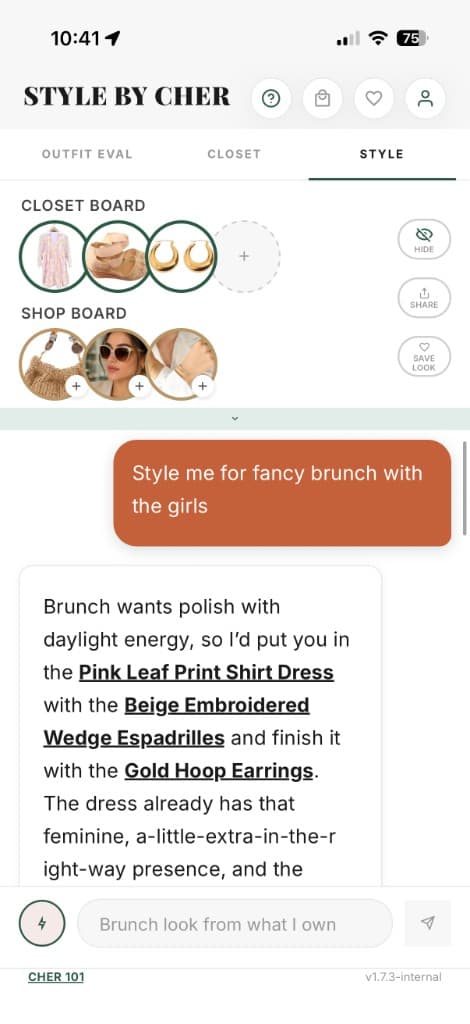
Start with a useful part of your wardrobe
- 1Add clothes to Closet using clear photos. Check the image and automatic garment details, correcting anything that is wrong.
- 2Open Style and explain the occasion, weather and constraints. Identify the pieces you want to use.
- 3Use Outfit Board to pin pieces you want to build around, then ask for the rest of the look.
- 4Save an outfit you like in Looks You Love and use Tell Cher to describe preferences for future suggestions.
Ask for a combination, with constraints
Results depend on what you have added and the context you provide; AI may overlook a piece or preference. Ask for a revision when the suggestion does not fit your needs.
What to add first
Choose the clothes for a few real situations: an ordinary workday, a relaxed day and an upcoming event if useful. Include bottoms and footwear, not only tops. There is no required minimum closet size that guarantees useful suggestions. A small representative set can help you decide whether the workflow suits you.
Know the current limits
The free closet holds 50 items and 5 saved looks. A styling message uses 1 Cher Time credit; AI closet search uses 0.5. Other AI actions share the same allowance. Premium increases capacity and monthly credits; see the pricing page for the full explanation.
When another tool may suit you better
Cher is currently an iPhone app, with no Android version, outfit calendar, cost-per-wear tracking, dedicated packing list or human stylist service. The comparison library covers alternatives for those tasks. Choose the workflow you need rather than expecting one app to do everything.