How to get useful feedback
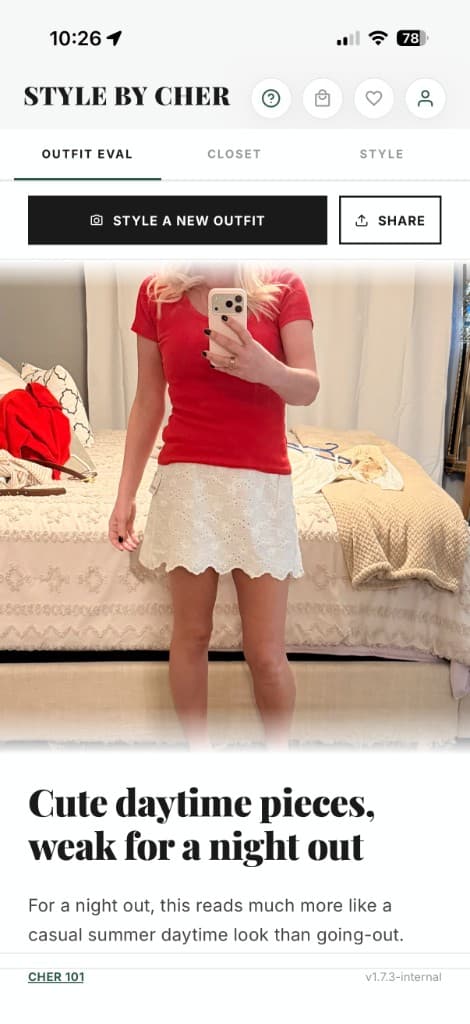
- 1Open Outfit Eval in the iPhone app and add a clear photo showing the clothes and shoes you want assessed.
- 2Provide the occasion and relevant preferences. Mention anything the photo cannot establish, such as warmth, walking or a shoe you need to keep.
- 3Read the suggestions, try any change that interests you and keep your own judgment about comfort and taste.
A specific question helps
If Cher misunderstands your preference, explain what you want to keep or change.
What a photo can and cannot show
A clear photo can support comments on visible colors, layers and proportions. AI can miss details or misread an image. It cannot reliably measure sizing, feel a fabric or know how shoes fit. Choose advice that serves your plans and preferences.
Try it with the free allowance
An outfit evaluation uses 3 Cher Time credits. The free plan starts with 45 introductory credits, then provides 25 credits per UTC calendar month after the introductory allowance is exhausted. Credits are shared with other AI actions; this is not a separate unlimited feedback allowance.
Your photo and your closet
Use a photo you are comfortable sharing for AI processing and leave unrelated private details outside the frame where possible. Read the photos-and-data page for the processors and handling described by Style by Cher. Add closet items when you want more suggestions tied to what you own.